Export Stripe Billing to DATEVSubscription accounting incl. revenue accrual – automated
finHero's GDPR-compliant Stripe-to-DATEV app, built together with tax advisors, creates GoBD-compliant booking batches for your subscriptions – including deferred revenue accrual and individual debtors.
The problem
Sound familiar?
Many SaaS companies lose hours every month on manual accounting workarounds. finHero puts an end to that.
Hours of manual effort
CSV downloads, adjustments and DATEV imports cost valuable time every month – time that's better spent on your product.
Error-prone bookings
Manual journal entries lead to errors and tedious corrections – a burden for you and your tax advisor.
Complex subscription accruals
Annual subscriptions, upgrades, credit notes – without automation, accrual quickly becomes a source of errors.
Lack of transparency
Without clear booking texts and references, it stays unclear which Stripe payment belongs to which receipt.
From subscription to booking
Stripe Billing in DATEV: how a subscription invoice moves through accounting
A subscription invoice from Stripe Billing passes through four stages before it arrives in the bank account. In the export, each stage becomes its own referenceable booking entry – so the path from invoice to payout remains fully traceable for your tax firm.
- 1Invoice is finalizedOn the billing date, Stripe creates the invoice with an invoice number. finHero exports it as a PDF receipt and links it to the subsequent booking.
- 2Payment comes inThe customer pays by card or SEPA Direct Debit. The payment is booked to the cash-in-transit account (Geldtransitkonto) – for an annual subscription, initially against deferred revenue.
- 3Stripe deducts feesTransaction fees and, where applicable, Billing fees are booked separately as expenses, not netted against revenue.
- 4Payout to the bankThe payout clears the cash-in-transit account. The bank transaction corresponds to exactly one Stripe payout.
| Amount € | Account | Contra account | Booking text |
|---|---|---|---|
| 1.428,00 | 1360 | 990 | Annual subscription Pro · invoice paid, deferred |
| 119,00 | 990 | 8400 | pRAP release annual subscription · month 1/12 |
| 58,31 | 1360 | 8400 | Monthly subscription Basic · invoice paid |
| 21,46 | 4970 | 1360 | Stripe fees for the period |
| 29,15 | 8400 | 1360 | Credit note downgrade · refunded |
| 1.435,70 | 1200 | 1360 | Stripe payout to bank |
Calculation: 1.428,00 € + 58,31 € − 21,46 € fees − 29,15 € credit note = 1.435,70 € payout. Typical standard accounts (SKR04: 1460, 3900, 4400, 6855, 1800) – agree the specific account assignment with your tax firm.
Deferred revenue accrual
Cleanly accrue annual subscriptions over their term
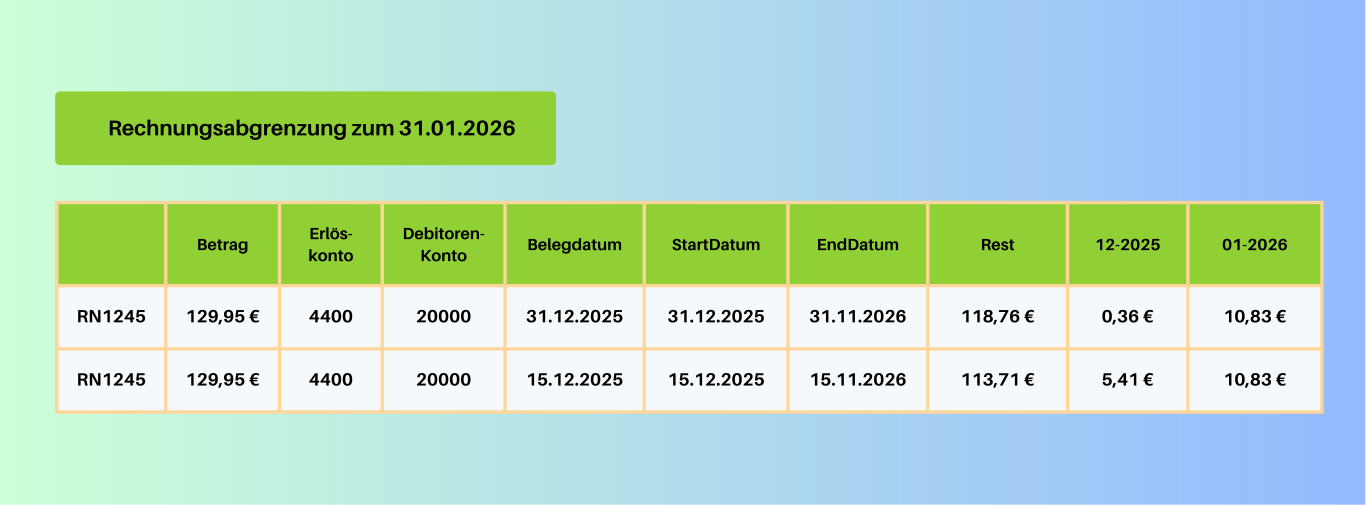
finHero distributes subscription revenue across the term on a period-accurate basis and maps deferred revenue accrual (pRAP) automatically – including up- & downgrades as well as credit notes.
Automatic pRAP bookings
Annual and monthly subscriptions are accrued down to the month.
Subscription changes included
Upgrades, downgrades and credit notes are accounted for consistently.
How the deferral works in detail and when it is required is explained in the guide to pRAP for SaaS subscriptions with Stripe.
Upgrades and downgrades
Proration in Stripe Billing: booking upgrades and downgrades correctly in DATEV
If a customer changes plans in the middle of a billing period, Stripe prorates: the unused time on the old plan is credited and the remaining time on the new plan is charged. Example: monthly subscription Basic for 50 € net, upgrade to Pro for 100 € net halfway through a 30-day month.
| Item | Net | VAT 19 % | Gross |
|---|---|---|---|
| Credit for unused time Basic (15 days) | −25,00 € | −4,75 € | −29,75 € |
| Remaining time Pro (15 days) | 50,00 € | 9,50 € | 59,50 € |
| Proration invoice balance | 25,00 € | 4,75 € | 29,75 € |
| Next regular invoice Pro | 100,00 € | 19,00 € | 119,00 € |
And for an annual subscription?
Upgrade after six months from 1.200 € to 2.400 € net per year: Stripe charges an additional 600 € net (714,00 € gross) for the remaining six months. At this point, the pRAP still holds 714,00 € from the old plan, plus 714,00 € from the additional charge. From now on, 238,00 € instead of 119,00 € is released each month. finHero adjusts the deferral automatically for upgrades and downgrades.
Corrections
Credit notes, voids and cancellations in Stripe Billing
Subscription business means corrections. Each variant affects accounting differently – which is why finHero exports credit notes and voids as PDF receipts in addition to invoices and books them with a reference to the original invoice.
Credit note
Reduces an already finalized invoice in full or in part. Depending on the setting, the amount is refunded, credited to the customer balance or settled outside Stripe. Revenue is corrected, and the credit note is the receipt.
Void
An open invoice is invalidated before it is paid. No money flows; for the receipt chain, finHero exports the void as a PDF so that the invoice number doesn't lead nowhere.
Cancellation
If a subscription ends at the end of its term, no correcting entry is created. An immediate cancellation with a pro-rata refund produces a credit note and a refund – for an annual subscription, the remaining pRAP is also corrected.
Uncollectible
Invoices marked as uncollectible are not incoming payments. Whether and how a receivable should be written off is decided by your tax firm.
Failed payments
Dunning in Stripe Billing: booking failed subscription payments
If collection of a subscription invoice fails, Stripe retries the charge depending on your settings and notifies the customer. For accounting purposes: a payment booking via the cash-in-transit account only arises once money actually flows.
- Open or overdue invoices do not create a payment booking as long as nothing has been collected
- A successful later collection attempt is booked on the actual payment date
- SEPA returned debits reverse the payment and appear as a separate booking
- Whether open invoices are booked as receivables depends on your booking logic – clarify this with your tax firm
Typical process for a failed payment
- 1Invoice finalized, collection fails
- 2Automatic retries and customer notification
- 3Payment successful → booking of payment, fee, later payout
- 4No success → subscription ends, invoice remains open, is voided or marked as uncollectible
Everything included
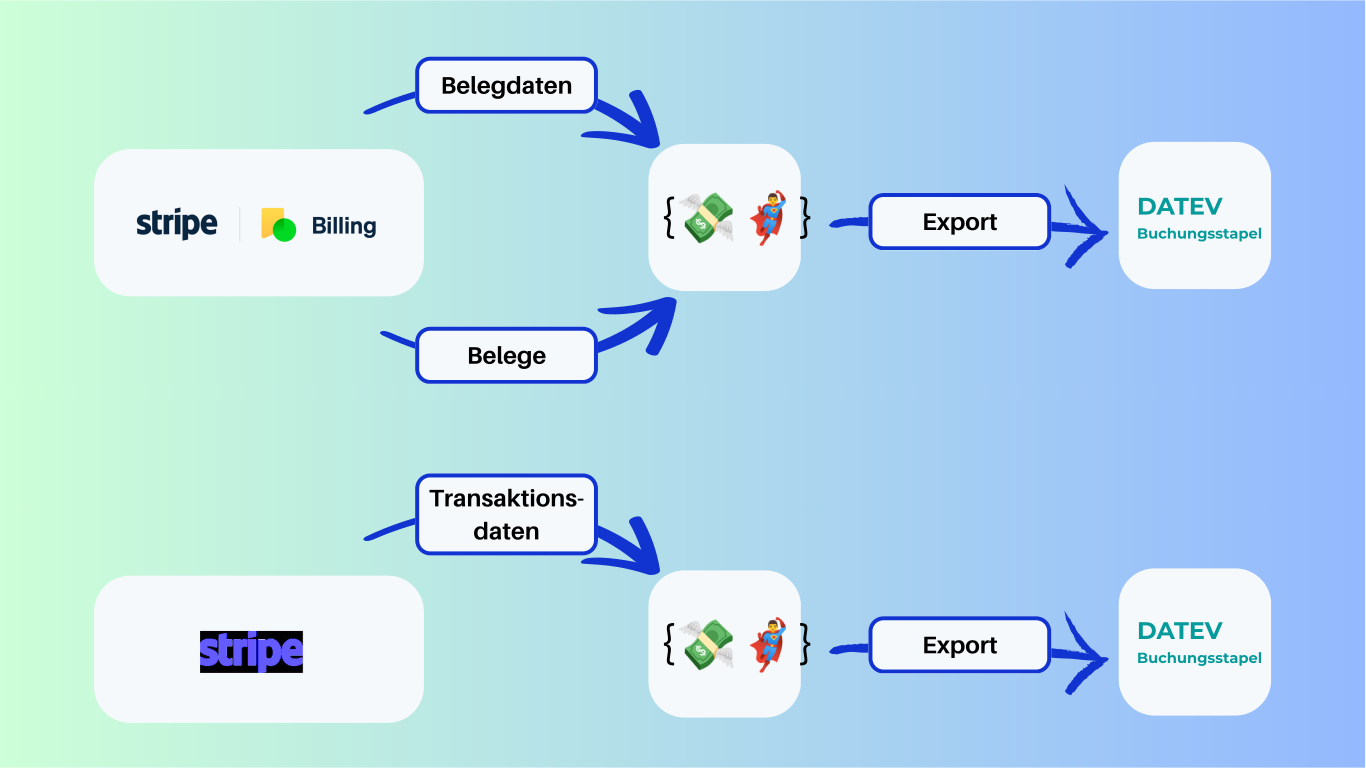
Export Stripe Billing in DATEV format
All Stripe bookings are ready for your tax advisor to download in DATEV format – retrieved, assigned, validated and ready to import directly.
Fully automated DATEV export
Invoices, credit notes and cancellations are prepared periodically in DATEV format and are ready for your tax advisor to download directly.
Deferred revenue accrual (pRAP)
Annual and monthly subscriptions are accrued automatically. Up- & downselling as well as credit notes on subscriptions – consistent and GoBD-compliant.
Custom accounts & posting keys
SKR03, SKR04 or your own chart of accounts – finHero books according to your specifications, including booking to individual debtors.
Retroactive corrections
Discounts and refunds from previous months are captured and exported. We solve historical gaps together.
Automatic account assignment
Customers are booked to the right accounts by payment method – flexibly adjustable via custom rules.
Fees booked cleanly
All Stripe fees are automatically assigned to the matching expense accounts – no manual follow-up.
Stripe App Marketplace
Connect Stripe Billing securely via the app
finHero is available as an app in the Stripe App Marketplace. Installation takes a few clicks, requires no code and gives finHero read-only access exclusively to invoices, payments, fees and payouts.
- Read-only access – finHero changes nothing in your Stripe account
- Multiple companies and clients in one account
- Retroactive exports for past months and years
- Foreign currencies at the ECB reference rate of the receipt date, rate stored
In 3 steps
Ready to go quickly and easily
Connect Stripe
Link your Stripe account to finHero via API – with no technical knowledge required.
Set up your tax advisor
Your tax advisor helps set up the booking accounts. Test exports are possible beforehand.
Export automatically
finHero exports periodically in DATEV format. You or your firm imports it with a single click.
The integration usually takes 5 working days – if everyone involved plays along, often just 2.
Customer voices
What our customers say
“Finally a tool that truly brings Stripe and accounting together. Saves us several hours every month.”
Lena
Finance Manager, e-commerce
“Honestly, I had no desire to deal with accounting – finHero takes almost all of it off my plate.”
Tobias
Founder, startup
“The automation is exactly what we were missing. Less Excel, fewer errors.”
Jan
Head of Finance, tech company
483 h
average time saved per year – €8,249 less in tax advisor costs
Pricing
Simple pricing – everything included
One plan. All features. No hidden costs – the price adapts to your invoice volume.
- Export in a few minutes
- Booking at line-item level
- Deferred revenue accrual (pRAP)
- Monthly cancellation period
- No cost for additional users
Pricing
Transparent & fair
Pay only for what you need. No hidden costs.
then 29,00 €/month · excl. VAT
First export free — cancel monthly
First export free
Try finHero with no obligation using one free trial export.
Email customer support
We help you with setup and any questions.
Maximum transparency & security
All exports are precisely prepared and ready to use directly in DATEV.
FAQ
FAQ: Stripe Billing to DATEV
Does my tax advisor need special expertise?
No. Your firm receives the booking data in the standardized DATEV format and imports it directly – without additional tools or specialist knowledge.
Are Stripe fees booked correctly too?
Yes. finHero captures not only invoices and subscriptions, but also all Stripe fees and automatically assigns them to the correct expense accounts.
What about manual payments by bank transfer?
finHero connects to Stripe via API. Transfers made outside of Stripe still have to be assigned manually in DATEV.
Is invoice accrual (pRAP) possible?
Yes. Stripe invoices are accrued monthly. The booking logic is set up individually – including automatic corrections when subscriptions change.
How long does setup take?
Usually 5 working days. If the tax advisor and accounting respond quickly, we often manage it in 2 days.
Can I catch up on accounting retroactively?
Yes. Many customers had historical gaps – we're happy to put together retroactive exports.
How much does it cost?
The pricing model adapts to your invoice volume. Calculate your individual price directly in the app or write to us.
How are proration invoices for upgrades and downgrades booked?
The pro-rata credit for the old plan and the pro-rata charge for the new plan appear on a single Stripe invoice. finHero books the balance as revenue or a correction and, for annual subscriptions, automatically adjusts the deferred revenue.
What is the difference between Stripe Billing and Stripe Payments in DATEV?
Stripe Payments are one-off payments, for example via Checkout or Payment Links. Stripe Billing generates recurring invoices from subscriptions with proration, credit notes and, where applicable, deferral. finHero exports both types into the same booking batch.
Are credit notes and voids also exported as receipts?
Yes. Invoices, credit notes and voids are exported as PDFs, linked to the booking via the transaction ID and listed in a receipt list.
Any more questions? Go to the Help Center
Read more
Ready to automate your Stripe accounting?
Connect Stripe in a few minutes and create your first DATEV booking batch for Stripe Billing – with receipts and pRAP.
Create your first export for free7-day free trial · cancel monthly









