Stripe Billing Best Practice for Accounting & DATEV
Map Stripe Billing into DATEV the right way – without CSV chaos
Anyone searching for “stripe billing best practise fibu datev” needs no theory, but a clean process. finHero automates the Stripe-to-DATEV export including fees, payouts, receipts, booking batches, SKR03/04 and pRAP – for reliable financial accounting in Germany.
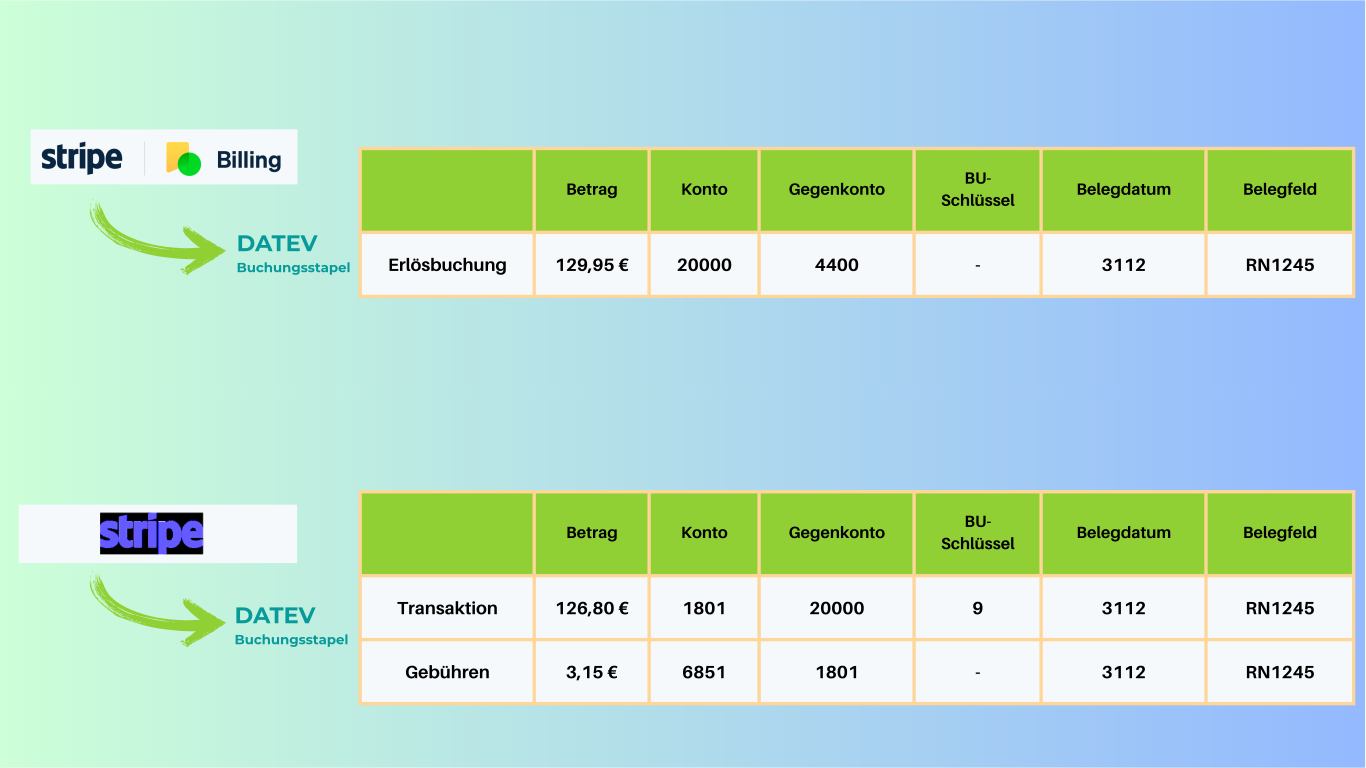
Why Stripe Billing in accounting with DATEV often causes problems
Stripe is a powerful payment provider, but not a ready-made accounting process for DATEV. In practice, challenges arise with fees, payouts, refunds, receipt matching and, for subscription models, also with period-accurate accrual.
That is exactly why many companies search for topics such as “can Stripe export payments to DATEV”, “how do I get Stripe into DATEV” or “Stripe interface export”. The real question behind it is almost always: What does the cleanest and most efficient process look like?
The typical mistakes with Stripe and DATEV
Many teams start with CSV files, Excel and manual DATEV imports. As volume grows, this becomes an error-prone process at the latest.
Only payouts get booked
Anyone who only looks at the payout amount loses transparency over gross revenue, fees, refunds and other movements.
CSV exports as a permanent solution
Manual exports from Stripe cost time every month and require reworking so the import into DATEV works at all.
Fees get mixed up
Stripe fees are often not booked separately. This complicates reconciliation and leads to unclear net and gross amounts.
Subscriptions are handled incorrectly
For subscriptions and annual contracts, a simple revenue export is not enough. Without pRAP the period-accurate representation is missing.
Stripe Billing Best Practice for Accounting & DATEV
The best solution is not just an export, but a clean, traceable DATEV process. That is exactly what finHero is designed for.
Separate gross revenue, fees and payouts
The clean separation of these cash flows is the foundation for reliable bookings in DATEV.
Use Stripe as a clearing account
A separate Stripe account or clearing account creates transparency between incoming payment and bank payout.
Prepare individual transactions in a structured way
Instead of just adopting aggregate values, relevant Stripe events are translated traceably into DATEV logic.
Make fees separately visible
Fees must not disappear into the net payout, but must be clearly shown and booked.
Link receipts with bookings
Invoices, credit notes and other documents should be linked directly to the matching booking entries.
Account for pRAP on subscription revenue
For SaaS and subscription models, period-accurate revenue accrual is a central part of clean accounting.
Can Stripe export payments to DATEV?
The short answer is: not in the form that German accounting typically requires. Stripe provides reports, APIs and CSV files. For a real DATEV process, however, the account-assignment logic, the separation of fees and payouts, the receipt linkage and, for subscription models, topics such as pRAP are usually missing.
That is exactly why many companies search for Stripe DATEV, Stripe with DATEV or Stripe interface export. What is actually sought is not a raw file, but a process that cleanly brings together accounting, tax advice and operational reality.
How do I get Stripe into DATEV?
The practical way is a specialized solution that does not just export Stripe data but prepares it logically for DATEV. This is exactly where finHero comes in.
Instead of adjusting raw data manually in Excel, finHero connects your Stripe account directly, analyzes transactions, fees, invoices, credit notes and payouts and generates from them a structured DATEV-compliant export.
This reduces manual work, increases traceability and relieves finance teams as well as tax firms.
Manual Stripe export vs. clean DATEV process logic
Many companies start with CSV files. The real best practice, however, is a repeatable, transparent and tax-advisor-friendly workflow.
| Area | Manual / generic approach | finHero |
|---|---|---|
| Stripe export | CSV files with rework | Automated DATEV preparation |
| Fees | Often hidden in the net payout | Separately visible and traceable |
| Payouts | Hard to reconcile | Clean reconciliation with Stripe logic |
| Receipts | Manual matching | Automatic linkage with booking entries |
| SaaS / subscriptions | Accruals often missing | pRAP and period-accurate logic possible |
| DATEV fit | High manual rework | Specialized in Stripe-to-DATEV |
How Stripe works with DATEV via finHero
Connect Stripe
Connect your Stripe account directly to finHero – without complicated manual exports.
Define accounting logic
Set up SKR03/04, accounts, rules and the requirements of your accounting or tax firm.
Export DATEV-compliant
finHero prepares transactions, fees, payouts and receipts automatically for the DATEV import.
Pricing
Transparent & fair
Pay only for what you need. No hidden costs.
then 29,00 €/month · excl. VAT
First export free — cancel monthly
First export free
Try finHero with no obligation using one free trial export.
Email customer support
We help you with setup and any questions.
Maximum transparency & security
All exports are precisely prepared and ready to use directly in DATEV.
A simple solution instead of a monthly special process
Anyone who wants to bring Stripe cleanly into DATEV needs no further workaround, but a clear, repeatable process.
finHero
Everything included- ✓Automated Stripe-to-DATEV export
- ✓Fees and payouts cleanly represented
- ✓Receipt export with linkage
- ✓SKR03 / SKR04 and custom accounts
- ✓Deferred revenue accrual (pRAP)
- ✓For SaaS, subscription and complex payment logic
- ✓Little manual reconciliation effort
- ✓Cancellable monthly
- ✓Fast setup and onboarding
Stripe Billing best practice for DATEV: what companies really need
Anyone searching for “stripe billing best practise fibu datev” usually means more than just a technical export. What is sought is a reliable solution for financial accounting. This is exactly where it becomes clear why Stripe and DATEV do fit together, but become unnecessarily complicated without specialized preparation.
A good solution has to do more than a simple report. It has to translate transactions, fees, payouts, invoices, credit notes and other Stripe events into clean DATEV logic. For subscription business models, additional requirements such as pRAP and the period-accurate recognition of revenue are added.
Companies that still work with CSV files today therefore quickly reach their limits. The more payments, refunds, fees and payouts arise, the greater the monthly reconciliation effort. A specialized Stripe-to-DATEV solution like finHero replaces this manual intermediate layer with a structured and repeatable workflow.
The goal is not just an import into DATEV, but a process that lets finance teams, tax advisors and accounting work efficiently. That is the real best practice.
Frequently asked questions about Stripe Billing, accounting and DATEV
Stripe provides raw data, reports and CSV files, but no fully DATEV-compliant booking logic for German accounting processes. For clean booking batches, fee logic, receipt linkage and pRAP, a specialized solution makes sense.
Most cleanly via a specialized Stripe-to-DATEV solution like finHero. It prepares transactions, fees, payouts, invoices and credit notes in a structured way for DATEV.
The best practice is to represent gross revenue, Stripe fees and payouts separately, match receipts cleanly, use a clearing account for Stripe and, for subscription models, account for pRAP or period-accurate accruals.
A CSV export does contain transaction data, but usually does not represent fees, payouts, corrections, receipt references and DATEV-specific account-assignment logic in a way that lets the import work without manual rework.
Yes. finHero supports SKR03, SKR04, custom account logic as well as deferred revenue accrual for SaaS and subscription business models.
For SaaS companies, e-commerce companies, finance teams, tax firms and all companies in Germany that use Stripe and want to map their accounting cleanly into DATEV.
Ready to bring Stripe Billing cleanly into DATEV?
Replace manual CSV processes with a structured, traceable and DATEV-compliant workflow with finHero.









