Integrate Stripe into DATEV
Can Stripe export payments to DATEV?
No, not directly. Without a specialized extension, Stripe cannot export data directly to DATEV. Companies in Germany need an additional solution like finHero for this, which prepares Stripe data in a DATEV-compliant way – including fees, payouts, receipts, booking batches, SKR03/04 and pRAP.
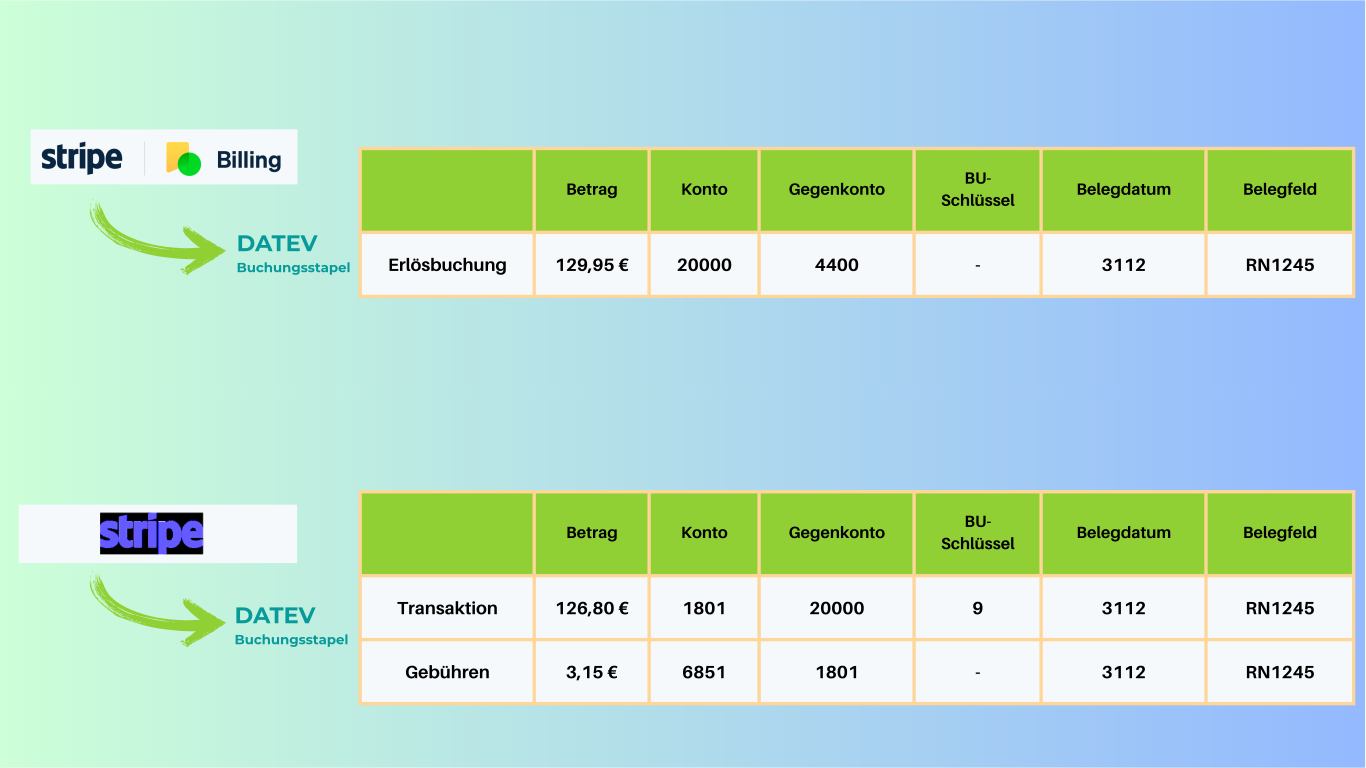
The short answer: Stripe itself does not export to DATEV
Many companies search for “Can Stripe export payments to DATEV?” or “How do I get Stripe into DATEV?”. The clear answer is: Stripe alone is not enough for this.
Only with a specialized extension like finHero is Stripe data prepared so that it can be exported in a structured, DATEV-compliant way. This includes payments, fees, payouts, invoices, credit notes and receipts.
Why Stripe and DATEV don't come together cleanly without an additional solution
Anyone using Stripe needs more than just data for DATEV – they need robust accounting logic. That is exactly where the gap appears in practice.
Stripe provides no native DATEV interface
Without an additional solution, there is no direct path from Stripe into a DATEV-compliant export process.
Raw data is not the same as accounting
CSV or reporting data from Stripe often has to be manually checked, supplemented and structured in practice.
Fees and payouts are error-prone
Fees, payouts and refunds in particular quickly lead to reconciliation effort in accounting without clear logic.
SaaS and subscription models are complex
Recurring revenue, invoices and accruals require more than a simple export.
finHero closes the gap between Stripe and DATEV
finHero is not a generic accounting phrase, but the specialized extension for companies in Germany that want to map Stripe cleanly into DATEV.
DATEV-compliant Stripe export
finHero turns Stripe data into a structured export process for DATEV – instead of disconnected raw data.
Map fees & payouts cleanly
Payment flows are prepared transparently so that your accounting doesn't have to rework anything manually.
Booking batches & receipt export
Booking data and receipts can be prepared so that the tax firm and finance team can work efficiently.
SKR03 / SKR04 & custom accounts
Whether standard chart of accounts or custom requirements: finHero can be adapted to your logic.
pRAP for subscriptions and SaaS
Deferred income (passive accruals) and recurring revenue are supported consistently.
Traceable booking texts
Clear references and transaction links reduce queries and make the monthly close easier.
How do I get Stripe into DATEV? Only via an additional interface
The practical route does not go directly through Stripe itself, but through a solution that prepares Stripe data for DATEV.
Connect Stripe
Connect your Stripe account to finHero once. After that, the relevant payment data can be processed in a structured way.
Define accounting logic
Set up SKR03, SKR04 or custom account logic as well as the requirements of your accounting or firm.
Export in a DATEV-compliant way
finHero prepares payments, fees, payouts, refunds and receipts for the DATEV import.
Stripe alone vs. Stripe with finHero
The decisive question is not whether Stripe can display or export data, but whether it results in a DATEV-ready process.
| Area | Stripe alone | Stripe + finHero |
|---|---|---|
| Direct DATEV export | No, not natively available in Stripe | Yes, via specialized export logic |
| Fees & payouts | Only as raw data, not DATEV-ready | Structured and prepared for DATEV |
| Receipts & assignment | No direct DATEV link | Receipt export and traceable assignment |
| SKR03 / SKR04 | Not natively mapped in Stripe | Supported |
| SaaS / subscriptions / pRAP | Not prepared for DATEV accounting | Suitable for complex accounting cases |
Pricing
Transparent & fair
Pay only for what you need. No hidden costs.
then 29,00 €/month · excl. VAT
First export free — cancel monthly
First export free
Try finHero with no obligation using one free trial export.
Email customer support
We help you with setup and any questions.
Maximum transparency & security
All exports are precisely prepared and ready to use directly in DATEV.
Simple pricing – everything included
One plan. All features. No hidden costs.
fin-hero
Everything included- ✓Export in just a few minutes
- ✓Simplest setup & onboarding
- ✓Service requests resolved within 48 hours
- ✓Monthly cancellation period
- ✓End-to-end tests for an error-free application
- ✓For special and demanding requirements
- ✓Booking at line-item level
- ✓Deferred income (pRAP)
- ✓No costs for additional fin-hero users
Can Stripe export payments to DATEV? The precise answer
Many companies, tax advisors and finance teams search for the question “Can Stripe export payments to DATEV?”. The background is clear: anyone using Stripe in their company wants to transfer payment data cleanly into accounting.
However, the important clarification is: Stripe itself cannot export data directly to DATEV without an additional extension. There is no native DATEV interface in Stripe that automatically prepares booking batches, receipts, fees, payouts and account assignment logic in a DATEV-compliant way.
This is exactly where finHero comes in. finHero extends Stripe with a specialized DATEV connection for companies in Germany. As a result, Stripe payments are not just exported, but prepared for the actual requirements of accounting.
This is particularly important because a pure raw data export is usually not enough for DATEV in practice. Accounting and the tax firm need traceable booking records, correctly accounted fees, a clean representation of payouts and receipt references and – depending on the business model – topics such as SKR03, SKR04 or pRAP.
So anyone asking “How do I get Stripe into DATEV?” is really looking for a working connection between Stripe and DATEV. Stripe alone is not the solution, but rather a specialized extension like finHero.
What companies with Stripe and DATEV really need
In Google searches, questions are often asked that sound technically simple but are considerably more complex in accounting. These include search queries such as “Stripe DATEV”, “Stripe DATEV interface” or “How do I get Stripe into DATEV?”.
Behind these search queries there is almost always the same requirement: payment data from Stripe should arrive in DATEV in such a way that no laborious rework in Excel or manual reconciliation between the finance team and the firm is necessary.
This is exactly the point where a general data export differs from a practical solution. For day-to-day accounting, it is not just individual transactions that count, but also fees, payouts, refunds, invoices, credit notes, receipt references and clean account assignment logic.
finHero specializes in closing exactly this gap for German companies. The goal is not a mere export, but a robust DATEV process for Stripe-based business models.
Frequently asked questions about Stripe and DATEV
No, Stripe cannot export data directly to DATEV without a specialized extension. For a DATEV-compliant export, companies need an additional solution like finHero that prepares Stripe data to suit accounting.
Not directly through Stripe itself, but through a specialized extension like finHero. You connect your Stripe account to finHero, define the accounting logic and then export the data in a DATEV-compliant way.
Stripe is a payment service provider and offers raw data and reporting exports, but no native DATEV interface. Without an additional solution, DATEV lacks the appropriate export structure, booking logic, receipt linking and the clean representation of fees, payouts, refunds and account assignments.
Typically relevant are payments, fees, payouts, refunds, invoices, credit notes, receipts and traceable booking texts. For SaaS and subscription business models, period-accurate accruals such as pRAP are often added as well.
Yes. finHero supports SKR03, SKR04 and custom account assignment logic so that Stripe data can be exported to suit your accounting or tax firm.
finHero is particularly suitable for companies in Germany that use Stripe and want to map their accounting cleanly into DATEV – especially SaaS companies, subscription models, digital business models and tax firms.
Stripe alone is not enough for DATEV
Use finHero as a specialized extension for the DATEV-compliant export of your Stripe data – including fees, payouts, receipts and booking batches.









