How to book Stripe in accountingStripe bookings that pass every reconciliation.
Are you a controller or accountant at a subscription business, still transferring Stripe transactions & invoices into DATEV manually? finHero automates the export – fast, error-free and a 100% precise fit for your company.
Month-end close today
Your daily challenges
Stripe is built for payment processing, not for financial accounting. Today, the gap is usually closed by you – by hand.
Time-consuming exports
CSV downloads from Stripe, manual adjustments and DATEV imports cost valuable working time.
Error-prone bookings
Manual booking entries lead to errors and tedious corrections – a burden for you and your tax advisor.
Complex charts of accounts
SKR03, SKR04 or individual accounts – without automation you quickly lose track.
Lack of transparency
Without clear booking texts it stays unclear which Stripe transaction is assigned to which account/receipt.
Booking logic
Stripe in accounting: how the money flows
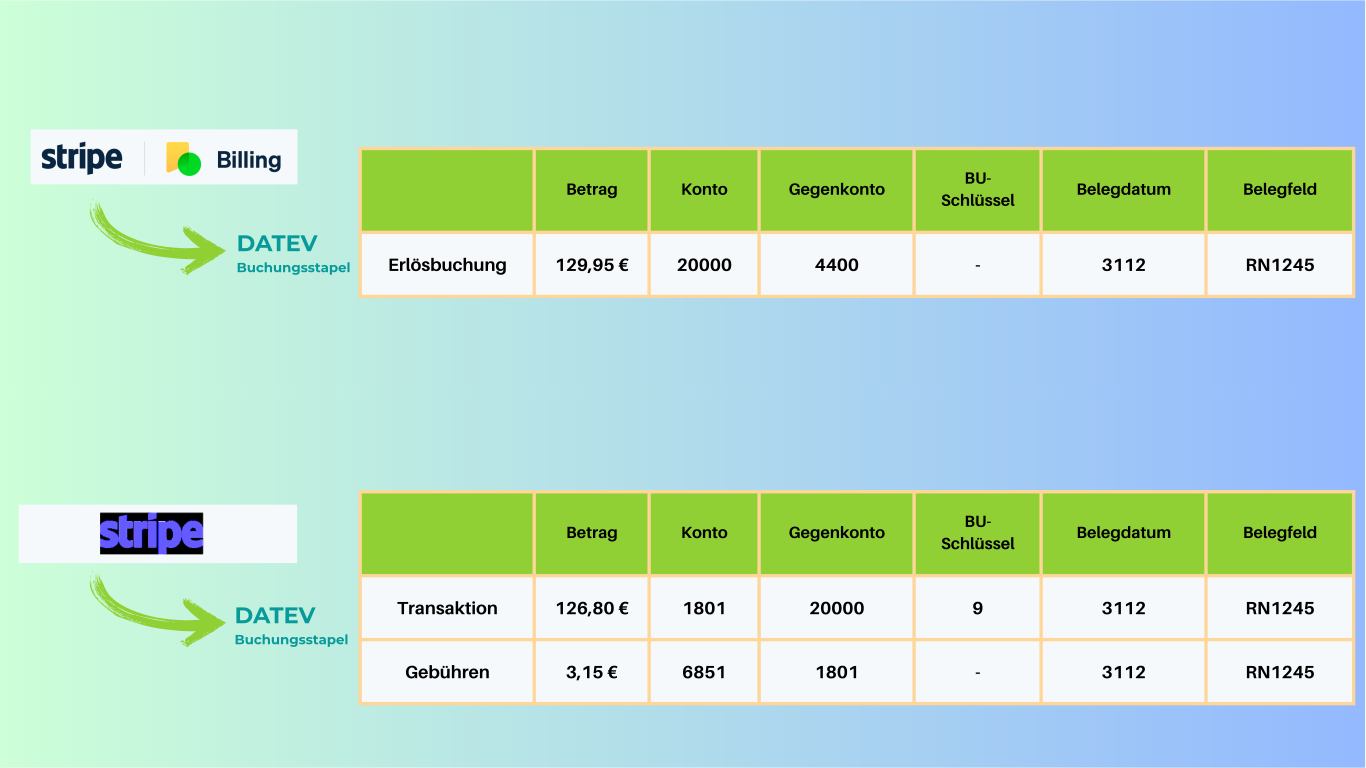
Stripe doesn't pay out each payment individually. It collects revenue, deducts fees and refunds, and transfers the balance in one bundle. A cash-in-transit account (Geldtransitkonto) is a clean way to map this.
- 1Payment to revenueEach customer payment is booked to the cash-in-transit account against the matching revenue account – with invoice number and transaction ID.
- 2Fees separatelyStripe fees are booked as expenses per transaction instead of disappearing into the net payout.
- 3Refunds & disputesRefunds and chargebacks reduce revenue and the Stripe balance – as separate, referenceable entries.
- 4Payout clears the balanceThe transfer to your bank account clears the cash-in-transit account. If a balance remains, something is open.
| Amount € | Account | Contra account | Booking text |
|---|---|---|---|
| 119,00 | 1360 | 8400 | Stripe payment · RE-2026-0412 · ch_3R…8Lp |
| 1,92 | 4970 | 1360 | Stripe fee · ch_3R…8Lp |
| 1.428,00 | 1360 | 990 | Annual subscription · Deferral (pRAP) |
| 119,00 | 990 | 8400 | pRAP release · May |
| 29,75 | 8400 | 1360 | Partial refund · re_3R…2Fv |
| 1.515,33 | 1200 | 1360 | Stripe payout · po_1R…6Qa |
Account assignment
Typical accounts for Stripe in SKR03 and SKR04
A starting point for aligning with your tax firm. You set up the accounts in finHero once – after that, every booking is assigned accordingly.
| Booking | SKR03 | SKR04 | Note |
|---|---|---|---|
| Stripe balance (cash in transit) | 1360 | 1460 | Clearing account between payment and payout |
| Revenue 19 % VAT | 8400 | 4400 | Domestic revenue; EU and non-EU revenue on separate revenue accounts |
| Stripe fees | 4970 | 6855 | Incidental costs of payment transactions; clarify VAT treatment with your tax firm |
| Bank account (payout) | 1200 | 1800 | Clears the cash-in-transit account |
| Deferred revenue (pRAP) | 0990 | 3900 | Prepayments for annual subscriptions, released monthly |
| Debtors | 10000–69999 | 10000–69999 | Individual debtors or a collective debtor, as specified |
Standard accounts of the DATEV charts of accounts. You define the final account assignment together with your tax firm.
Month-end close
Stripe in accounting: month-end checklist
These points should add up every month before the data goes to your tax firm. finHero checks them automatically and provides the evidence along with it.
Check before handover
- The total of all bookings matches the Stripe balance report
- Every payout is matched to the bank receipt, and the cash-in-transit account is cleared
- Fees, refunds and disputes are booked separately
- Every booking has a receipt (invoice, credit note, cancellation)
- pRAP for annual subscriptions is recognized and released for the month
- Foreign-currency revenue is converted at a traceable rate
Features
The solution: finHero
finHero was developed specifically for controllers and accountants in the subscription business. It covers the entire process from Stripe transactions to the DATEV import – including receipt export, booking batches and deferred revenue accounting. Individual accounts & posting keys as well as full SKR03/04 compatibility ensure seamless integration.
Fully automated DATEV export
Transactions, invoices, credit notes & cancellations are prepared periodically for the DATEV import – with no manual effort.
Individual accounts & posting keys
SKR03/04 or your own chart of accounts – finHero follows your specifications and makes the tax firm's work easier.
Deferred revenue accounting (pRAP)
For subscriptions, accruals are generated automatically – fast, consistent and audit-proof.
Traceable bookings
Every booking entry contains clear descriptions and transaction IDs for maximum transparency.
Automatic document linking
Customer invoices & receipts are intelligently linked to the matching booking entries – no manual allocation.
Flexible booking rules & debtors
Define rules and individual debtors for an optimal, client-specific DATEV integration.
GoBD & audit
Auditable from transaction to booking
finHero provides the technical building blocks you need for GoBD-compliant processing of your payment data.
SHA-256 checksum
Every export package receives a cryptographic fingerprint – later changes can be detected.
Festschreibung (finalization)
Booking batches are handed over with the Festschreibung flag; the entries are finalized in DATEV by your tax firm.
Historized ECB rates
Foreign currencies are converted at the rate of the receipt date, and the rates are stored.
Process documentation
A template for the sub-process “payment provider → financial accounting” is included.
How it works
Set up in three steps
Connect Stripe
Connect your Stripe account to finHero – no technical knowledge required.
Define accounts
Optionally set up accounts & posting keys (SKR03/04).
Export automatically
finHero exports periodically – you import the ready-made DATEV export.
FAQ
FAQ: booking Stripe in accounting
Which account is the Stripe balance booked to?
The usual choice is a cash-in-transit account (SKR03 1360, SKR04 1460) or a dedicated clearing account for Stripe. Payments, fees and refunds run through it, and the payout to the bank clears it. You define which account to use in finHero.
How are Stripe fees booked?
Fees are booked separately as expenses, typically to incidental costs of payment transactions (SKR03 4970, SKR04 6855) – not netted in the payout. You agree on the VAT treatment with your tax firm.
Are payouts reconciled automatically?
Yes. Every payout is linked to the transactions it contains and checked against the Stripe balance report. This makes it traceable which payments, fees and refunds make up the bank receipt.
Individual debtors or a collective debtor?
Both are possible. You define whether customers are set up as individual debtors or booked via a collective debtor – in line with your tax firm's requirements.
How are receipts handed over?
Invoices, credit notes and cancellations are exported as PDF and linked to the bookings via the transaction ID. A receipt list is part of every export.
How do you handle foreign currencies?
Foreign-currency revenue is converted at the ECB reference rate on the receipt date. Rate and source are stored so every conversion stays reproducible.
Can we map multiple Stripe accounts or companies?
Yes. finHero supports multiple clients with their own charts of accounts and booking rules.
Can past periods be booked retroactively?
Yes. Retroactive exports are possible, for example when switching during the current fiscal year.
More questions? Go to the help center
Ready to ease the load on your accounting?
Try finHero free for 7 days and experience how easy Stripe-to-DATEV can be.
Try for free7 days free · cancel monthly









